
Of course. Here is the rewritten article, revised according to your feedback and guidelines.
Tension headaches at the end of the workday, dry, gritty eyes by lunchtime, and a struggle to refocus on anything but your screen. If this sounds familiar, you’re not alone. Millions of Australians experience digital eye strain, a modern-day repetitive strain injury for your eyes. But finding lasting relief involves more than just remembering to take breaks.
Understanding the root cause of your discomfort is the first step toward clear, comfortable vision. This guide explains the mechanics behind digital eye strain and outlines the practical steps and professional advice you need to protect your eye health in a screen-dominant world.
What is Digital Eye Strain and Why Does it Happen?
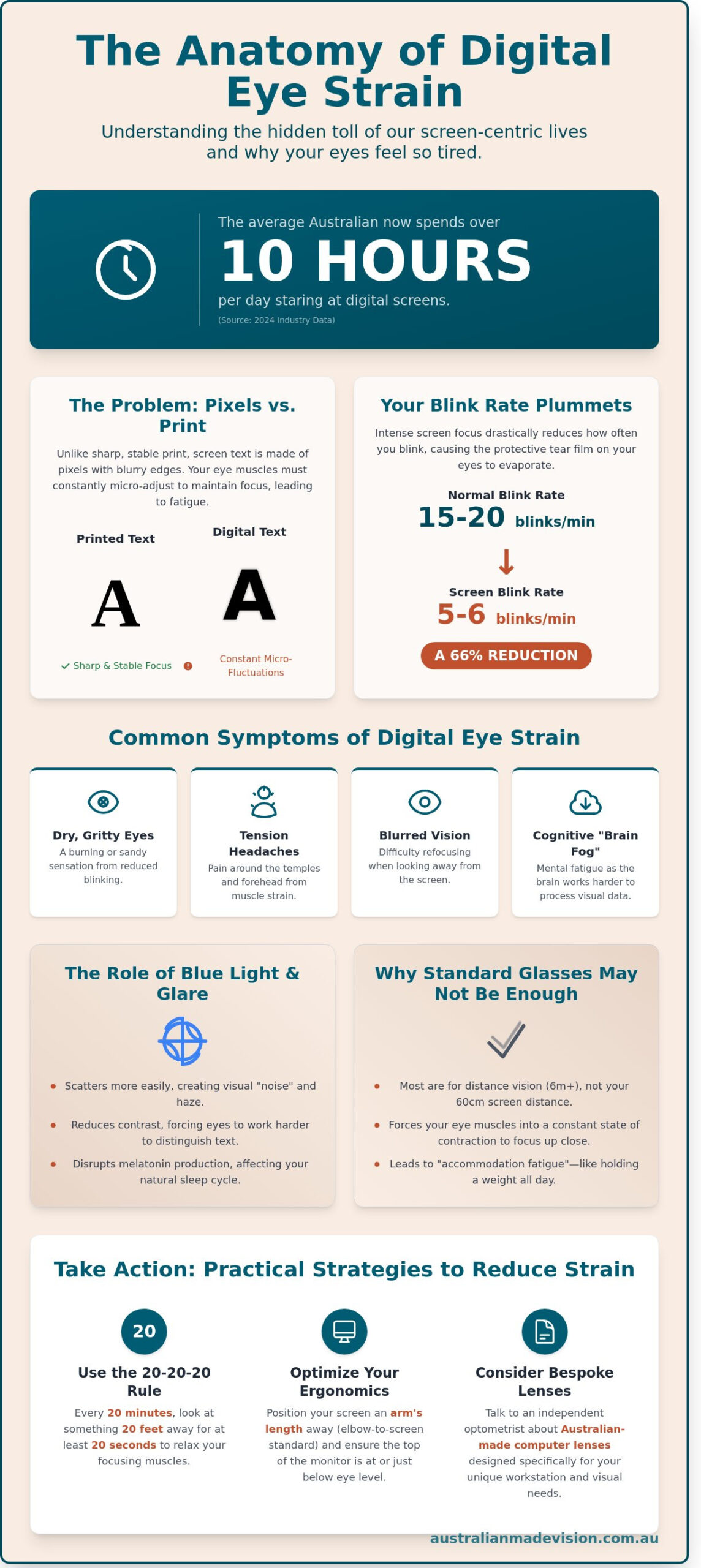
Digital eye strain, also known as Computer Vision Syndrome (CVS), is the physical discomfort felt after two or more hours in front of a digital screen. It’s a direct result of the unique demands that digital displays place on our visual system. Unlike printed text with solid, sharp edges, the characters on a screen are made of pixels, which have less contrast and blurrier outlines.
Your eyes have to work constantly to maintain focus on these pixels, leading to a state of continuous tension in the ciliary muscles inside your eyes. This constant effort can lead to a range of symptoms, including:
- Persistent headaches and neck or shoulder pain.
- Dry, tired, or burning eyes.
- Blurred or double vision.
- Increased sensitivity to light.
- Difficulty concentrating or “brain fog.”
The Role of Glare and Blue Light
Digital screens emit high-energy visible (HEV) light, often called blue light, which can scatter more easily than other light. This scattering reduces contrast and can create digital glare, forcing your eyes to work even harder to distinguish details. While the long-term effects are still being studied, excessive blue light exposure, particularly at night, can also interfere with your body’s natural sleep cycle.
Why Your Blink Rate Matters
When we concentrate on a screen, our blink rate can drop by up to 66%. Blinking is essential for spreading a fresh layer of tears over the surface of the eye, keeping it moist and clear. When we don’t blink enough, this tear film evaporates, leading to the dry, gritty sensation many office workers know all too well. Left unaddressed, this can contribute to chronic dry eye syndrome. For a deeper dive into how our eyes work, you can explore The Human Eye: A Comprehensive Guide to Vision Health and Care.
Why Your Current Glasses Might Not Be Helping
If you already wear glasses, you might assume they’re suitable for screen work. However, a prescription designed for driving or general distance vision may not be optimised for the specific focal length of your computer screen, which is typically in the intermediate range (around 50-70cm from your face).
When your glasses aren’t suited for your workspace, your eye muscles must work harder to compensate, a process known as accommodation. Over an eight-hour day, this can lead to significant muscle fatigue, just like any other muscle in your body would feel after a prolonged workout. In some cases, an inappropriate prescription can even make the strain worse.
Signs Your Prescription Needs a Professional Review
- You find yourself leaning closer to the screen or tilting your head to find a “sweet spot.”
- You take your glasses off to read your computer screen more clearly.
- You experience neck and shoulder pain from craning to see through the bottom part of your multifocal lenses.
- Your symptoms of eye strain persist despite taking regular breaks.
If any of these situations apply to you, it may be time to discuss your specific screen-related needs with an optometrist.
How to Reduce Digital Eye Strain: Practical At-Home Strategies
While a professional consultation is the best way to address underlying issues, you can implement several effective strategies right away to reduce discomfort.
1. Master the 20-20-20 Rule
This is the most crucial habit to build. Every 20 minutes, look at something at least 20 feet (or 6 metres) away for 20 seconds. This simple act allows the focusing muscles inside your eyes to relax completely, resetting your visual system and preventing fatigue from building up. Set a timer on your phone or computer to remind you.
2. Optimise Your Desk Ergonomics
Your physical setup plays a huge role in visual comfort.
- Screen Position: Position your monitor so the top of the screen is at or slightly below eye level.
- Distance: Keep the screen about an arm’s length away from your face.
- Lighting: Arrange your workspace to avoid glare from windows or overhead lights. Use soft, ambient lighting rather than harsh, direct light.
3. Adjust Your Digital Settings
Make your screen work for you, not against you. Increase the text size and adjust the contrast to a comfortable level. Many devices also have a “night mode” or blue light filter that warms the screen colour, which can be easier on the eyes, especially in the evening.
Your First Step to Relief: The Independent Optometry Advantage
While the tips above can provide temporary relief, persistent eye strain often indicates an underlying issue that requires a professional diagnosis. This is where a comprehensive eye examination with an independent optometrist becomes invaluable.
Unlike a quick, 15-minute corporate check-up, an independent optometrist invests the time to understand your specific lifestyle and work habits. They focus on long-term health rather than high-volume sales, providing a level of personalised care that is essential for diagnosing the nuances of digital eye strain.
What to Expect from a Digital Eye Health Examination
A thorough assessment for digital eye strain goes beyond a standard vision chart. Your optometrist will likely:
- Discuss Your Work Habits: They’ll ask about your screen setup, how many hours you spend on devices, and the specific symptoms you experience.
- Test for Binocular Vision Issues: They will check how well your eyes work together as a team, looking for conditions like convergence insufficiency, where the eyes struggle to turn inward to focus on a near object.
- Assess Your Focusing Ability: The optometrist will measure your eye’s accommodative function to see if your focusing muscles are fatiguing easily.
- Evaluate Tear Film Quality: To address symptoms of dryness, they will examine the health of your ocular surface.
Understanding Your Lens Options for Screen Work
Based on your examination, your optometrist may recommend specific lens solutions tailored to your digital life. This is not about buying cheap “blue blockers” online; it’s about a prescribed medical device designed for your unique visual needs.
Options they might discuss include:
- Advanced Lens Coatings: High-quality anti-reflective coatings can significantly reduce glare from screens and overhead lighting, improving visual comfort. Some coatings also include a specific filter to reduce blue light transmission.
- Occupational Lenses: These are specialised lenses designed for office work. They provide a wide, clear field of vision for the intermediate (computer screen) and near (keyboard and documents) zones, which helps maintain a natural posture and reduces the need for your eyes to constantly refocus.
The key is that these solutions are recommended as part of a holistic eye health strategy. An independent optometrist has the freedom to source lenses from a wide range of suppliers, ensuring they can find the perfect technology to solve your specific problem.
Conclusion: Your Path to Comfortable Vision
Reducing digital eye strain requires a two-pronged approach: building healthier habits and ensuring you have the right professional support. By optimising your workspace and consciously taking breaks, you can alleviate immediate discomfort.
However, for a lasting solution, a comprehensive eye examination is non-negotiable. An independent optometrist can provide a precise diagnosis and a personalised management plan, giving you the tools you need to work, study, and connect comfortably in the digital age.
If you’re ready to address the root cause of your screen fatigue, the next step is to book a consultation.
Find an independent Australian optometrist near you
Frequently Asked Questions
Can digital eye strain cause permanent damage to my vision?
Currently, there is no scientific evidence to suggest that digital eye strain causes permanent damage to your eyes. However, it can cause significant discomfort and contribute to chronic conditions like dry eye syndrome if left unaddressed.
Do blue light glasses actually work for reducing computer strain?
Blue light filtering glasses may help reduce some symptoms like glare and visual fatigue for certain individuals. However, they are not a cure-all. The primary causes of eye strain are often related to focusing fatigue, uncorrected vision problems, and reduced blink rate, which blue light filters alone do not address. A comprehensive eye exam is the best way to determine the true cause of your discomfort.
What is the 20-20-20 rule and how do I do it correctly?
Every 20 minutes, take a 20-second break to view something at least 20 feet (6 metres) away. This allows the focusing muscles in your eyes to relax. The key is to look far enough away for your eyes to change focus completely from your near-work task.
How can I tell the difference between a normal headache and eye strain?
Headaches from eye strain are often described as a dull, aching pain behind or around the eyes. They typically occur after prolonged screen use and may be accompanied by other symptoms like tired or dry eyes. If headaches are persistent, you should consult both your GP and an optometrist.
How is an eye exam for digital strain different from a standard one?
A digital eye strain exam focuses more heavily on how your eyes function at near and intermediate distances. It includes specific tests for focusing stamina, eye teaming (binocular vision), and tear film health, in addition to checking your standard prescription.
Can I reduce eye strain without buying new glasses?
Yes. Implementing ergonomic changes, practicing the 20-20-20 rule, managing screen settings, and using lubricating eye drops can all significantly reduce eye strain symptoms without the need for new glasses. However, if your symptoms persist, it may indicate an underlying vision problem that new glasses could correct.
Disclaimer
The information in this article is provided for general educational purposes only and should not be considered medical advice. For personalised advice regarding your vision or eye health, please consult a qualified optometrist.
Australian Made Vision is an independent directory that helps patients find optometrists across Australia who may offer Australian-made spectacle lenses. We do not provide clinical services and recommend contacting practices directly to confirm the products and services they offer.