
At a desk, you might switch between a monitor, printed documents, and people across the room. Occupational progressive lenses are designed to give priority to these near and intermediate tasks. You may also hear them described as occupational lenses or office lenses, as well as workplace progressive lenses, workspace progressive lenses or office progressives. Their purpose is to provide viewing areas suited to indoor work. Whether they suit you depends on your prescription, the distances you use and how the glasses are fitted. They are often a second pair alongside everyday spectacles.
What are occupational lenses or office lenses?
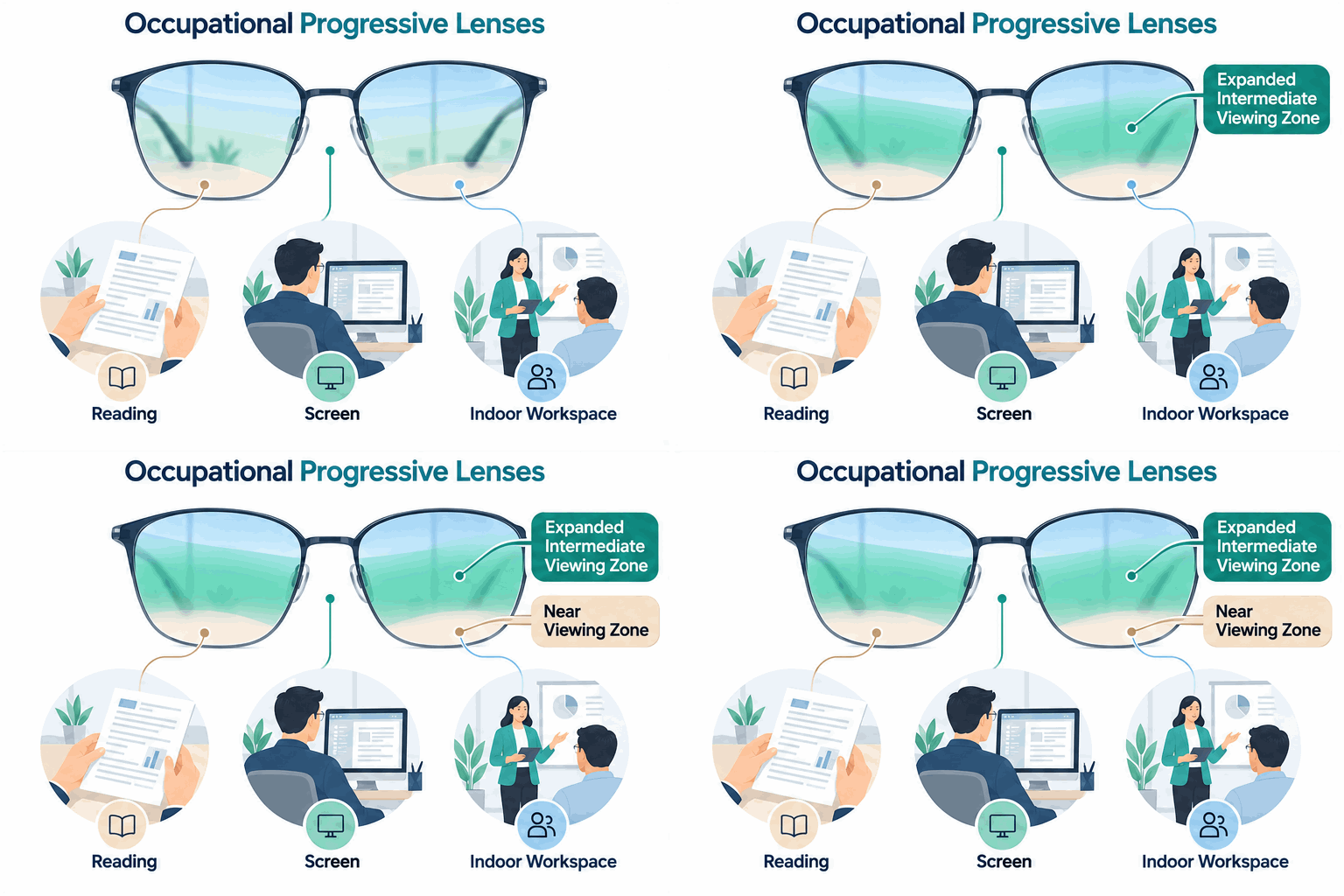
Occupational progressive lenses change in power across the lens to support more than one working distance. Unlike a coating or screen filter, this is an optical design selected for the tasks you need to see.
They are commonly considered when presbyopia makes close focusing harder, often from around age 40. Designs differ, so the words occupational, workplace, and office do not identify one standard range or specification.
GLASSES FOR YOUR WORKDAY
Switching between screens and paperwork?
Find a local optometrist to discuss whether occupational progressive lenses suit your prescription, working distances and desk setup.
Find an Optometrist →Office progressive lenses versus everyday progressives
Near, desk, and room: choosing the right working depth
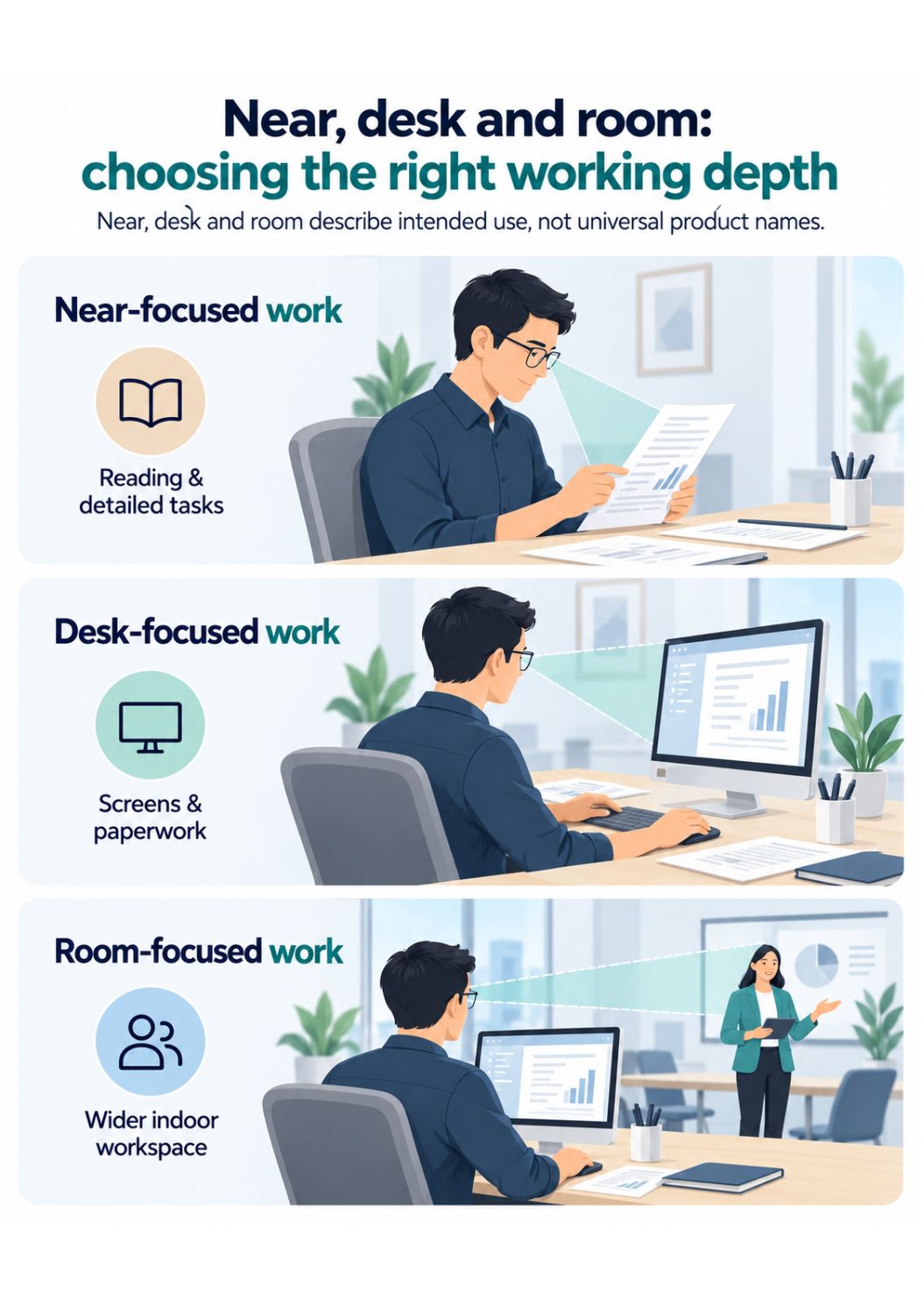
Three useful ways to describe occupational lens options are near, desk, and room. These are descriptions of intended use, not universal product names or fixed distance promises.
Near-focused work
A near-focused design gives priority to reading, paperwork, and detailed work close to you. Discuss how much additional reach you need beyond the page, particularly if you also check a screen.
Desk-focused work
A desk-focused design covers the mix of paperwork, keyboard, and monitor tasks around a workstation. It may suit someone who spends most of the day switching between a screen and documents.
Room-focused work
A room-focused design extends the useful viewing range to more of the indoor workspace, such as a colleague or presentation across the room. That additional reach changes the balance of the near and intermediate areas. Ask which tasks the selected design covers.
Comparing lens options for desk work
The comparison below explains the usual purpose of each option. The prescription and individual design still determine its usable viewing areas.
| Lens option | Usual viewing priority | Main limitation |
|---|---|---|
| Reading glasses | Close reading at the prescribed distance. | May not suit a monitor further away. |
| Single-vision computer glasses | One selected screen or working distance. | Limited flexibility when tasks use different distances. |
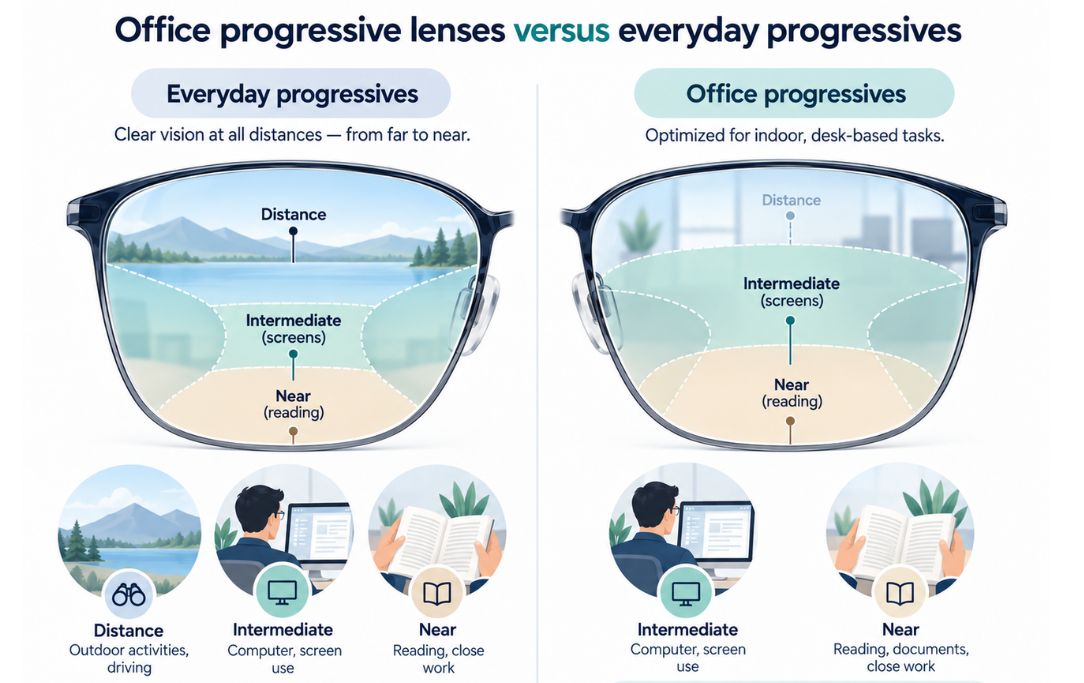
| Workplace progressives | A range of near and intermediate tasks, selected for the workspace. | Usually need a separate pair for distance tasks or driving. |
| Everyday progressives | Distance, intermediate and near tasks through different zones. | The intermediate corridor may be less suited to prolonged desk work. |
Our guide to spectacle lens types explains how single-vision, progressive, and occupational lenses fit among other options.
Who may benefit from workplace progressive lenses?
These lenses may be worth discussing if you can read comfortably in your usual glasses but find a monitor difficult to position within the clear area, or if you frequently switch between documents, screens, and people nearby.
Examples include office staff, people working from home, reception staff, and anyone doing sustained close or intermediate tasks. Single-vision computer glasses may be sufficient for one consistent screen distance. The task pattern matters more than the job title.
Workplace progressive lenses for dual monitors
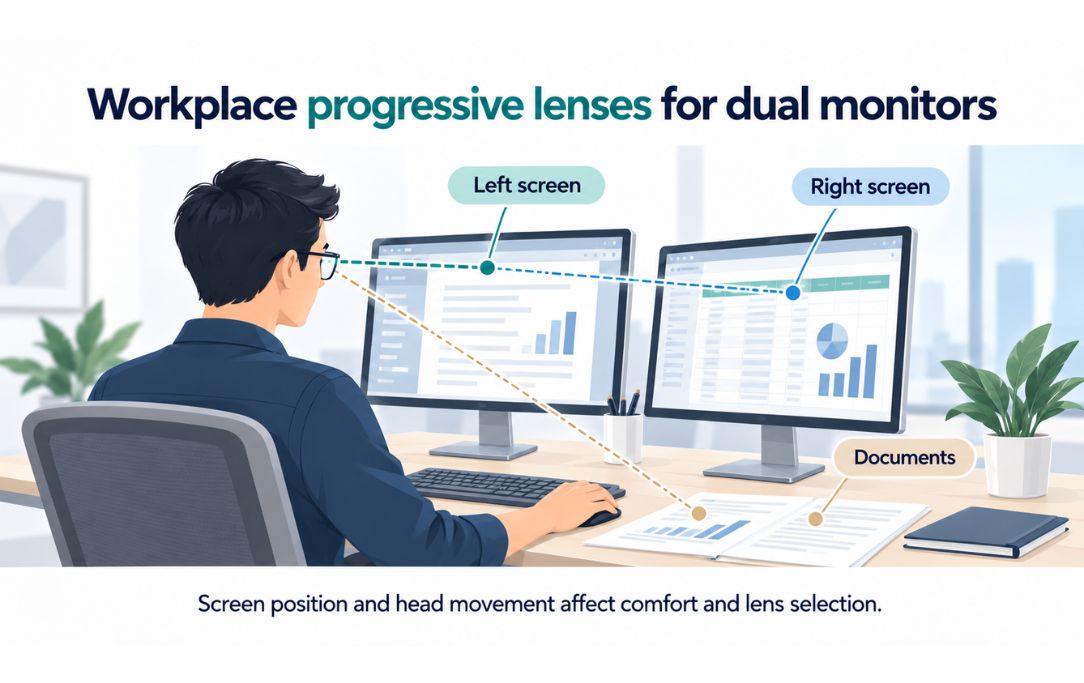
Dual monitors can add side-to-side viewing demands, especially when the screens are wide or positioned at different distances. Workspace progressive lenses may offer useful near and intermediate coverage, but no design guarantees that both monitors will be clear in every direction.
Tell the optometrist how you use each screen, where documents sit and whether you turn your head or lift your chin to see. Screen height, angle, and placement should be considered alongside the lenses. A wider lens zone does not replace sensible workstation positioning.
Is Your Eye
Health on Track?
Complete our free 18-point checklist to check your eye health, spot any gaps, and take charge of your vision.
Start Free Checklist Test →Why fitting height and frame depth matter
Why discuss workplace lenses with an independent practice?
What workplace lenses cannot do
Workplace glasses may not replace your usual distance spectacles. Peripheral clarity and useful viewing distances vary by design and prescription. Check their limitations before wearing them away from the desk, and use glasses suitable for driving.
Not a treatment for eye strain
A 2018 Cochrane review found low- to very-low-certainty evidence for relieving computer-related eye symptoms, so occupational lenses should not be presented as a proven treatment for eye strain.
Blurred vision, headaches, or discomfort can have several causes, including prescription changes, dry eyes, reduced blinking and workstation conditions. An eye examination can help identify contributing factors. Regular breaks and appropriate lighting remain useful considerations.
If reflections from the lenses are distracting, our guide to anti-reflective coatings explains what coatings can and cannot do.
Questions to ask before choosing workplace lenses
- Which tasks need near, desk, or room coverage in my working day?
- Would single-vision computer glasses or occupational progressive lenses better match those tasks?
- How will my dual monitors and document positions affect selection and fitting?
- Does this frame have the depth and fitting height required for the recommended design?
- When should I switch to my everyday or driving glasses?
- What should I do if vision or comfort is not satisfactory after receiving the glasses?
Important information
This guide provides general optical information rather than an individual prescription. Arrange an eye examination for persistent or changing symptoms. Sudden vision loss, severe eye pain, or a sudden significant change in vision requires urgent medical assessment.
Sources
- Healthdirect Australia. Presbyopia. Last reviewed September 2024.
- Better Health Channel (Victoria). Eyes – common problems.
- Optometry Australia. Computers & vision. Patient information brochure, 2018.
- Heus P, Verbeek JH, Tikka C. Optical correction of refractive error for preventing and treating eye symptoms in computer users. Cochrane Database of Systematic Reviews. 2018; CD009877.
- Singh S, et al. Blue-light filtering spectacle lenses for visual performance, sleep, and macular health in adults. Cochrane Database of Systematic Reviews. 2023; CD013244.
- Office lens design and viewing zones. Professional technical overview.
- Occupational lens fitting and frame position. Professional guidance.
- Office lens development and frame fitting requirements. Technical interview.
Frequently asked questions
Are occupational lenses, office lenses and workplace progressives the same?
Occupational lenses and office lenses are common names for lenses intended for near and intermediate tasks. Occupational progressive lenses, workplace progressive lenses and workspace progressive lenses are related terms you may also encounter. These names do not guarantee identical designs or viewing ranges. Ask which near, desk and room tasks the recommended pair is intended to cover.
Can I drive in workplace progressive lenses?
Do not assume they are suitable for driving. Many occupational designs prioritise near and intermediate vision rather than the required distance area. Check with your prescribing optometrist and use spectacles suitable for driving.
Are indoor workplace lenses the same as blue-light glasses?
No. Workplace lenses change in prescription power across the lens. Blue-light filtering is a separate feature, and a 2023 Cochrane review found it may not reduce short-term eye strain from computer use. Read our guide to blue-light glasses.
Can workplace lenses help with dual monitors?
They may provide useful near and intermediate viewing areas, but suitability depends on your prescription, screen positions and lens design. Discuss both screens and any paperwork during the assessment, rather than choosing based on the monitor count alone.
Find an independent optometrist
Discuss occupational progressive lenses and your workstation needs with an independent optometry practice. Use the Australian Made Vision optometrist directory to explore participating practices, confirm their services and arrange an appointment.

Take the Next Step
Considering Workplace Lenses?
Bring your current glasses and workstation measurements to a local optometrist. Discuss lens options and fitting for the distances you use throughout your workday.
Find an Optometrist →
Australian Made Vision is an independent directory that helps patients find optometrists across Australia who may offer Australian-made spectacle lenses. We do not provide clinical services and recommend contacting practices directly to confirm the products and services they offer.